
eJOY extension allows you to look up words directly on any webpage without opening a new tab.
With the new AI Translation feature, you can instantly understand the meaning of words in context without interrupting your reading flow.
✨ New Feature: AI Translation
Introduced in October 2025, AI Translation provides:
Instant AI-powered definitions, displayed below Google Translate results for comparison
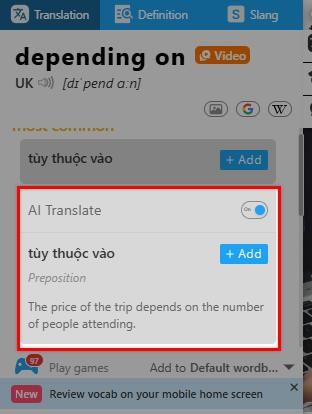
No need to click buttons or open a dictionary window
Highly accurate for:
- Academic and technical terms
- Idioms and phrasal verbs
- Sentences with hidden meanings or natural language style
🔁 This is a major upgrade from word-for-word translation to context-aware translation.
1. How to look up words using eJOY extension
There are two ways to look up new words using eJOY eXtension, depending on your extension settings.
Option 1: Quick Lookup on the Page (Recommended)
- Highlight or double-click the word/phrase you want to learn
- The AI translation and other dictionary results appear immediately
Option 2: Active Lookup via eJOY Extension
Pin the eJOY icon to your browser toolbar → Click eJOY icon → Select Look up tab → Type what you want to lookup & press Enter
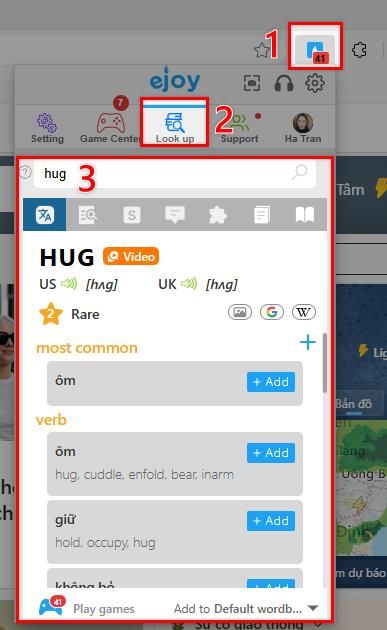
2. What’s inside the Lookup pop-up?

1 – Tabs: The translation – definition in English – common slang – example – collocation – synonyms & antonyms – word family.
2 – Video (Word Hunt) – Explore real video contexts where the word appears
3 – The word popularity – The larger the number, the more popular the word
4 – Extended Resources: image – lookup word on Google, Wikipedia.
5 – Save Word: Save the Google Translate definition
6 – Game – Shortcut button to go to the game section with saved words.
7 – Choose Vocabulary Notebook – Save words to a specific notebook.

8 – AI Translation – Instant AI-powered translation and examples

9 – AI Explain – In-depth AI explanation of meaning and usage.
10 – Other Dictionaries – Look up words in Oxford, Cambridge, and more.
11 – Advanced Translation / AI Deep Dive – Open an extended page for deep knowledge or ask AI questions.
✅ Summary
With eJOY extension, you can:
- Instantly see AI translations while reading
- Understand words in context, not just literal meanings
- Access examples, videos, games, and dictionary resources in one pop-up
- Save words and learn efficiently with AI explanations