
When you sign up for an eJOY account using your email address, we immediately send a verification email to the address you provided. You must open that email and click the “Verify” button to complete the verification process and activate your account.

❗ I Didn’t Receive the Verification Email or Can’t Click the “Verify” Button
If you can’t find the verification email or the Verify button isn’t clickable, please follow the steps below 👇:
1. Check Other Folders (Spam / Junk / Promotions)
Sometimes the verification email may be filtered into folders such as:
- Spam / Junk
- Promotions
➡️ If the email landed in your Spam / Junk folder, you may not be able to click any buttons inside it.
👉 Mark the email as “Not Spam” / “Not Junk” to move it to your main inbox.
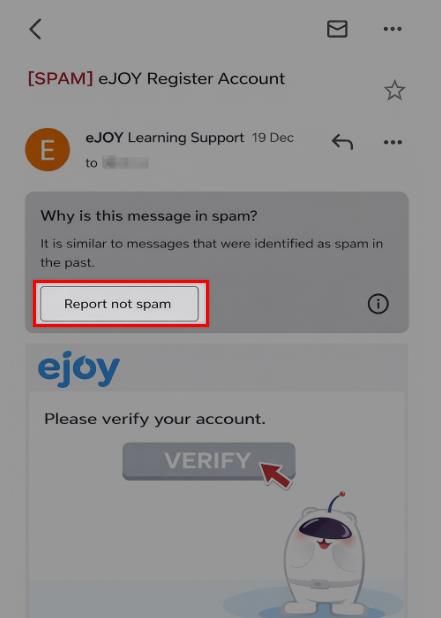
👉 Once it’s in your primary inbox, open the email and click “Verify” normally.
2. Resend the Verification Email
If you still can’t find the verification email:
- Go back to the eJOY verification screen.
- Click Resend / Send Again to request a new verification email.
➡️ A new email will be sent to your registered address.

3. If Your Email Address Was Entered Incorrectly
If you entered the wrong email address by mistake:
- Go back to the sign-up page.
- Enter your correct email address.
- Submit the form to register again.

📩 Still Need Help?
If you’ve tried all of the above and still cannot receive or verify your email, please contact us for support: [email protected]