
1. EJOY has upgraded to a new system
From October 2023, eJOY has updated to a new system. There are now two co-existing systems called eJOY 1 and eJOY 2.
- eJOY 1 includes: eJOY app 1 and eJOY Reader app
- eJOY 2 includes: eJOY app 2, eJOY Extension, eJOY web 2, and eJOY Go
In eJOY 2, all of your data will auto-sync between products without needing to press the sync button anymore. For example: If you save a word in app 2, it will be auto-synced to the eJOY extension after about 10 seconds. Sometimes, there might be a slight delay depending on network stability.
🛑 So, if you just need to sync data between app 2, ejoy extension, and web 2, you don't have to hit sync at all. For web 2, sometimes you might need to refresh (F5) the page for quicker updates.
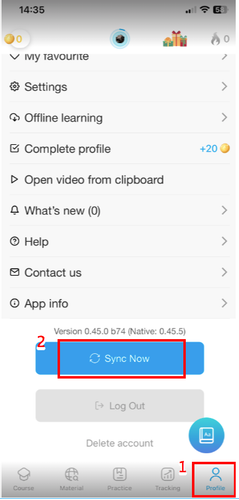
🛑 However, if you require immediate synchronization, you can manually initiate it by pressing the synchronization button within both the app 2 and the eJOY extension, as illustrated in the image below:

2. What happens to your data in app 1?
(Please skip this part if you have never used eJOY app 1 or don't have any vocabulary in eJOY app 1)
- Since October 2023, all of your past vocabulary data has been automatically transferred to the new system - eJOY 2. That means you can now see and continue reviewing the vocabulary you saved in app 1 on app 2.
- However, if you've recently saved words in app 1 since October 2023 and don't see them synced up to app 2 or the eJOY extension, please follow these steps:
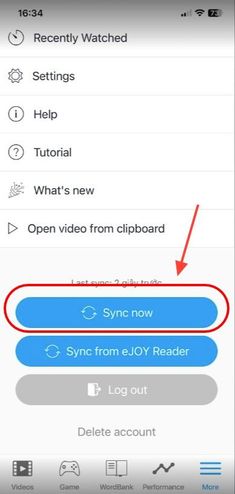
Step 1: Open eJOY 1 app, make sure you have updated to the latest version on the Appstore and Google Store, and press the Sync button.
Step 2: Access eJOY WordBank web (beta) at https://ejoy-english.com/app.
Step 3: Press the sync button in the bottom left corner of the screen.

- The synchronization process may take a few minutes due to the large amount of data, and this is the first time syncing to the new system.
- After a successful synchronization, you will see a green banner notification on the new eJOY web. Additionally, you can also see all the vocabulary you've saved on the eJOY ecosystem products within the eJOY extension and app 2.
Note: Please do not click the sync button if you do not want to transfer your data from app 1 to app 2, web 2, or the eJOY extension.
3. Advantages of the new vocabulary system
With the new system, you can:
- Easily manage vocabulary and word lists on app 2, eJOY extension, and the new eJOY web.
- Review saved vocabulary when using the eJOY extension on your computer via the eJOY English 2 app.
- Play vocabulary review games from app 2 directly on your laptop.
- Save words and phrases up to 600 characters long - not only expanding your vocabulary but also preserving ideas, new knowledge, and valuable information.
4. What will happen to my vocabulary on the Reader app?
Vocabulary data from your Reader app will not be synchronized with the new system at this time.
EJOY suggests you switch completely to using eJOY app 2 instead of eJOY app 1 + Reader app as app 2 has more features and can automatically sync data with other products in the eJOY ecosystem.